ChatArchive





ChatArchive is a Chromium extension for exporting conversations from modern AI chat products into clean local files. It is designed around per-platform adapters, layered extraction strategies, and diagnostics that make breakages easier to detect and repair when sites change.
The project currently focuses on reliable export, readable Markdown, and maintainable extraction logic rather than one-off scraping hacks.
Export chats from ChatGPT, Gemini, Claude, Perplexity, Grok, DeepSeek, Mistral, HuggingChat, Meta AI, Poe, Copilot, Phind, and You.com into clean Markdown, Obsidian, PDF, HTML, text, JSON, and CSV files without sending your data to a backend.
Website · Download latest release · Load unpacked in Chromium · See supported platforms
Why ChatArchive
- Local-first export with no backend service
- Broader adapter coverage across 13 modern AI chat websites
- More durable extraction through per-platform adapters and layered fallbacks
- Multiple output formats for notes, backups, and downstream tooling
- Built-in diagnostics that make breakages faster to understand
- Fixture tests plus scheduled compatibility checks to keep support visible
Quick start
- Download the latest
.zipfrom GitHub Releases. - Extract it locally.
- Open
chrome://extensions. - Enable
Developer mode. - Click
Load unpackedand select the extracted folder.
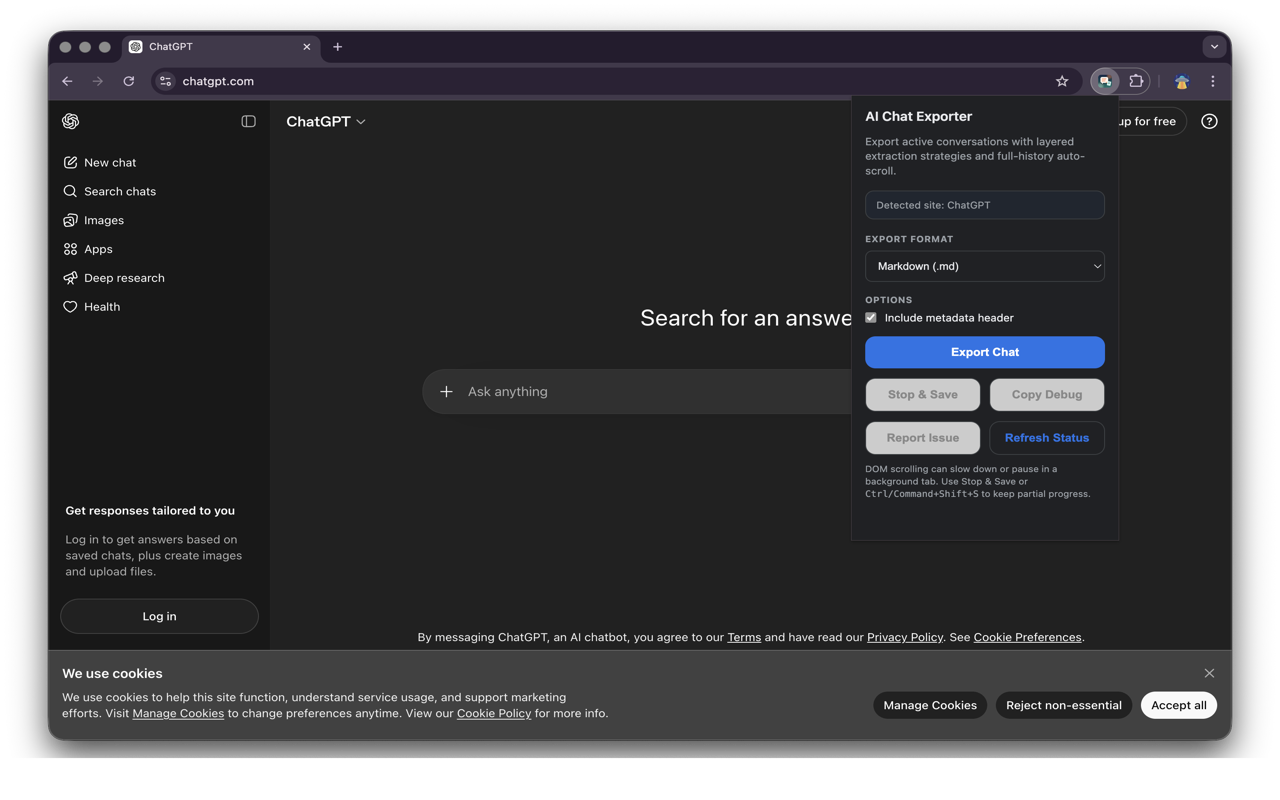
Preview
Highlights
- Multi-platform export for major AI chat products
- Markdown, Obsidian Markdown, PDF, HTML, plain text, JSON, and CSV output
- API-first or state-first extraction when a platform exposes stable conversation data
- DOM fallback with confidence scoring when more stable data is unavailable
- More robust conversation title extraction across DOM and state-backed pages
- Popup diagnostics showing platform, extraction source, strategy, confidence, and message count
Stop & Savesupport for long-running DOM exports- Custom filename templates with tokens:
{platform},{title},{date},{time},{source},{strategy},{count} - Message limit option for partial or specific-length exports
- Persistent settings for format, metadata, templates, and limits
- Debug-report copy and prefilled broken-export issue reporting
- Fixture-based regression tests plus scheduled live smoke checks
Supported platforms
| Platform | Status | Primary extraction path |
|---|---|---|
| ChatGPT | Supported | state, fallback dom |
| Gemini | Supported | state, fallback dom |
| Claude | Supported | api, fallback dom |
| DeepSeek | Supported | api, fallback dom |
| Perplexity | Supported | page or dom |
| Grok | Supported | dom |
| Mistral | Supported | dom |
| HuggingChat | Supported | dom |
| Meta AI | Supported | dom |
| Poe | Supported | dom |
| Copilot | Supported | page (shadow DOM) |
| Phind | Supported | dom |
| You.com | Supported | dom |
Platforms with API or state-backed extraction are generally more stable than DOM-only platforms.
Export formats
- Markdown
- Obsidian Markdown
- HTML
- Plain text
- JSON
- CSV
Why this repo exists
Most AI chat exporters break for the same reason: they depend on a single fragile set of selectors. This repo takes a more durable approach:
- isolate each platform in its own adapter
- support multiple extraction strategies per platform
- prefer API or page-state data when available
- keep diagnostics visible to users
- add regression fixtures for real failures
That structure does not prevent website breakage, but it makes breakage faster to diagnose and cheaper to repair.
Current capabilities
- Full-history export with platform-aware auto-scroll
- Structured text cleanup for headings, links, blockquotes, ordered lists, unordered lists, and code blocks
- Print-ready PDF export with a polished local rendering path
- Partial export support for long conversations
- Custom filename templates for organized chat archives
- Message limit configuration for quick or specific-length exports
- Persistent popup settings across browser sessions
- Global stop shortcut:
Ctrl+Shift+Son Windows/Linux,Command+Shift+Son macOS - Metadata-rich exports including platform, extraction source, strategy, timestamp, and partial-export status
- More robust title extraction from platform-specific headers and page state where available
Long conversations
- If a platform uses
apiorstate, switching tabs is usually much safer. - If a platform falls back to
dom, Chromium may throttle background tabs. - For long DOM-based exports, keep the chat tab visible when possible.
- If needed, use
Stop & Saveto save the portion captured so far.
Project structure
src/popup/: popup UI and orchestrationsrc/content/: adapter discovery, extraction logic, formatting, and export generationsrc/background/: background command relay for stop-and-savetests/fixtures/: saved DOM snapshots used for regression coveragetests/: Node-based extraction tests usingjsdomscripts/: compatibility summaries and live smoke tooling
Development
Local setup
- Install Node.js 20 or newer.
- Run
npm install. - Run
npm test. - Load this repository as an unpacked extension in a Chromium-based browser.
- Reload the extension after changing
manifest.json,popup.html, or files undersrc/.
Packaging
npm run package:extensionCreatesdist/chatarchive-<version>.zip.- Pushing a tag like
v1.13.0triggers.github/workflows/release.yml, which tests the repo, builds the extension zip, and publishes a GitHub release.
Test strategy
npm testRuns fixture-based extraction tests withjsdom.npm run test:live-smokeRuns Playwright-based live smoke checks against real logged-in pages when secrets or local environment variables are configured.
Live smoke checks
The scheduled workflow in .github/workflows/daily-compatibility.yml runs in two layers:
- fixture compatibility checks that do not require credentials
- optional live smoke checks for real ChatGPT, Gemini, and Perplexity pages
To enable live smoke checks, configure these repository secrets:
SMOKE_CHATGPT_URLSMOKE_CHATGPT_COOKIESSMOKE_GEMINI_URLSMOKE_GEMINI_COOKIESSMOKE_PERPLEXITY_URLSMOKE_PERPLEXITY_COOKIES
Cookie secrets may be either:
- a raw cookie header string such as
name=value; other=value - a Playwright-compatible JSON cookie array
Before running the live suite locally, install the browser dependency:
npx playwright install chromium
Privacy and trust
- No backend service
- No remote data processing
- Exports are generated locally in the browser context
- Debug and issue-report tooling is user-initiated
This matters because a chat exporter should be auditable and easy to inspect.
License
MIT. See LICENSE.
Contributing
Contributions are welcome, especially around:
- platform compatibility fixes
- new platform adapters
- extraction fixtures for real-world failures
- Markdown fidelity improvements
- CI and smoke-test hardening
See CONTRIBUTING.md and ROADMAP.md for current expectations and direction.
Roadmap
- Add more platform adapters
- Add fixture capture tooling
- Improve handling for tables, attachments, and richer content blocks
- Expand authenticated live smoke coverage
Status
The project is ready for public iteration, but website extraction is an ongoing maintenance problem by nature. Expect adapter updates over time as platforms change their DOM, APIs, and page-state structures.